Estimated reading time: 12 minutes
Key Takeaways
- Safe Streaming: Always choose legal IPTV providers to avoid legal troubles and security risks.
- Provider Verification: Ensure your IPTV service has proper licensing and a clear reputation.
- Device Compatibility: Verify your IPTV provider offers official apps for your device, especially Firestick.
- Potential Risks: Illegal IPTV services can expose you to copyright issues, malware, and fraud.
- Cost Awareness: Be cautious of suspiciously low-cost services that promise extensive channel lineups.
Table of Contents
- What is IPTV in the USA and How Does the Market Look?
- IPTV Legality in the United States: What You Need to Know
- How to Identify Legal IPTV Providers for Your Firestick
- Best IPTV Apps and APK Considerations for Firestick
- Platform Coverage: IPTV on Multiple Devices
- Service Quality and Feature Comparison
- Geographic Licensing and US Market Focus
- Comprehensive Service Evaluation Framework
- Step-by-Step Legal Setup Guide
- Frequently Asked Questions About IPTV Legality
What is IPTV in the USA and How Does the Market Look?
Internet Protocol Television (IPTV) delivers TV content over your broadband connection instead of through traditional cable, satellite, or broadcast signals. This technology covers live TV channels streamed in real-time, video-on-demand libraries, and time-shifted content like catch-up TV and cloud DVR functionality.
The IPTV USA market has matured significantly, with several major players offering comprehensive alternatives to traditional cable TV. These services provide more flexible packages, month-to-month pricing, and the ability to watch across multiple devices with a single subscription.
The leading IPTV America services include:
- YouTube TV – Offers broad channel selection with excellent sports coverage
- Hulu + Live TV – Combines live television with Hulu’s extensive on-demand catalog
- fuboTV – Specializes in sports content and regional sports networks
- Sling TV – Provides cheaper, customizable channel bundles
- Philo – Budget-friendly option focused on entertainment channels
- DirecTV Stream – Offers traditional cable replacement experience
- Pluto TV and Xumo – Free, ad-supported streaming options
IPTV Legality in the United States: What You Need to Know
Is IPTV Legal? The Technology vs. Content Question
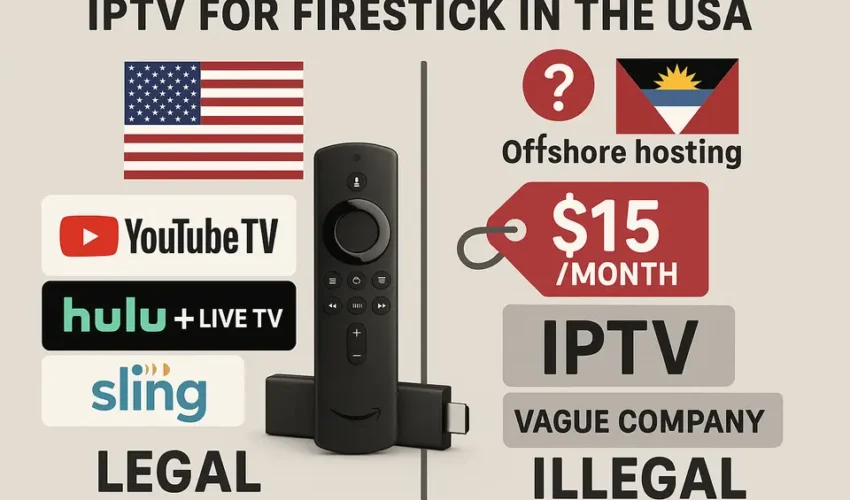
IPTV technology itself is completely legal in the USA. Streaming television over the internet represents another delivery method, similar to how you might stream Netflix or Amazon Prime Video. The critical legal distinction lies in whether your chosen service holds proper licenses for the content it distributes.
Legal IPTV services maintain contracts with television networks, movie studios, and sports leagues, paying substantial fees for distribution rights. These providers operate transparently, with clear business information, customer support, and compliance with US copyright laws. Source.
Illegal IPTV services, however, resell or restream channels, movies, and live sports without permission. They often advertise “all channels worldwide” packages at suspiciously low prices, operating in legal gray areas or outright violation of copyright laws.
US Regulations and Enforcement Actions
US copyright law, primarily under Title 17 of the U.S. Code, requires explicit permission from rights holders for public performance and distribution of copyrighted content. The legal landscape became stricter with the Felony Streaming Bill passed in late 2020, which increased penalties for commercial-scale piracy operations.
Federal authorities have repeatedly shut down illegal IPTV operations, seized domains, and pursued criminal charges against operators. These enforcement actions typically target services selling comprehensive “full cable” packages without proper licensing agreements. Source.
Penalties and User Risks
Operating illegal IPTV services can result in:
- Criminal charges, including felony counts in severe cases
- Substantial fines and asset seizures
- Prison sentences for repeat offenders
End users face different but real risks. While enforcement historically focuses on providers rather than individual subscribers, copyright holders can pursue civil lawsuits seeking damages from users engaged in willful infringement. Additionally, illegal services expose users to data theft, malware infections, and payment fraud. Source.
How to Identify Legal IPTV Providers for Your Firestick
Distinguishing legitimate services from potentially illegal alternatives requires careful evaluation. Here are the key indicators of trustworthy legal IPTV providers in USA for Firestick:
Official Licensing and Brand Reputation
Legitimate providers openly disclose partnerships with major networks like ESPN, NBC, FOX, and Disney. They receive coverage from mainstream technology and media publications as credible pay-TV alternatives. Services available in official app stores typically undergo vetting processes that require proper licensing documentation. Source.
Transparent and Realistic Pricing
Legal services charge market-level monthly fees, typically ranging from $20 to $90+ depending on channel selection and features. Be extremely cautious of services advertising “lifetime IPTV access,” monthly rates around $10 for “all premium sports worldwide,” or prices significantly below established competitors.
Clear Business Information
Trustworthy IPTV service comparison reveals that legitimate providers maintain:
- Proper business names, physical addresses, and customer support contacts
- Clear subscription terms, cancellation policies, and refund conditions
- Detailed privacy policies and terms of service
- Regular communication about service updates and changes
If you cannot locate basic company information, legal entity details, or transparent business practices, you’re likely dealing with an unlicensed service.
Official App Support and Updates
Legal services provide official applications for Firestick and other platforms, updated regularly with documented features and professional customer support. Questionable services often rely on generic media players and require manual entry of playlist URLs or “Xtream codes” without brand transparency. Source.
Best IPTV Apps and APK Considerations for Firestick
Amazon Fire TV and Firestick devices represent popular choices for IPTV America consumption. Here’s how to maintain legal compliance while maximizing your streaming experience.
Official Firestick IPTV App Options
The best IPTV app choices for Firestick users are official clients from major legal providers. These applications install directly from the Amazon Appstore and provide professional-grade streaming experiences:
- YouTube TV – Comprehensive live TV with unlimited cloud DVR
- Hulu + Live TV – Live channels plus extensive on-demand library
- fuboTV – Sports-focused with 4K streaming capabilities
- Sling TV – Flexible packages with add-on customization
- Philo – Entertainment-focused budget option
- DirecTV Stream – Traditional cable-like experience
- Pluto TV and Xumo – Free, ad-supported content
These Firestick IPTV app options cover virtually every legitimate streaming need for US audiences. Source.
Understanding IPTV APK Files and Sideloading Risks
You may encounter references to firestick IPTV APK files or claims about the best IPTV APK downloads distributed outside Amazon’s official store. While APK files (Android application packages) are legitimate software formats, many piracy-focused services distribute apps exclusively through sideloaded APKs to avoid store scrutiny. Source.
These services often advertise access to thousands of international channels, pay-per-view events, and premium sports content for minimal monthly fees. Such promises represent major red flags indicating potential copyright violations.
Platform Coverage: IPTV on Multiple Devices
Legal American IPTV services typically support multiple platforms, giving you flexibility in how and where you stream content.
IPTV on Roku Devices
Most major legal streaming services provide native Roku applications through the official Roku Channel Store. Roku has historically removed apps that enable unauthorized streaming, so presence in their store serves as a positive legality indicator. Source.
Smart TV Integration
Modern smart televisions from major manufacturers include app stores where legal IPTV USA services maintain official applications. LG webOS, Samsung Tizen, Google TV, and Android TV platforms all support major streaming providers directly, eliminating the need for additional hardware. Source.
Gaming Console Support
Xbox consoles support numerous streaming applications through the Microsoft Store, allowing legal IPTV on Xbox through official provider apps where available.
Samsung TV Specific Options
Samsung’s Smart Hub includes applications for major legal providers. When evaluating any IPTV Samsung app, prioritize well-known brands over obscure applications requesting M3U playlists or Xtream codes, which may serve as front-ends for unlicensed services.
Older Hardware Considerations
MAG box devices, popular in early IPTV setups, still receive support from some legitimate providers through official portals. However, this hardware segment also attracts unlicensed sellers. If you use MAG box hardware, verify that your provider operates transparently within US regulations.
Similarly, while IPTV Xtream Player and similar applications serve as legitimate media players, their legality depends entirely on the content provider. Many pirated services rely on Xtream-style connections, so only use such setups with clearly licensed providers. Source.
Service Quality and Feature Comparison
Searching for the best IPTV solution requires looking beyond price and channel counts. Focus on service quality, legal compliance, and features that enhance your viewing experience. Source.
Essential Features for Legal IPTV Services
When evaluating legitimate IPTV USA options, prioritize these capabilities:
- Channel lineup and regional rights – Local broadcast stations, national networks, and relevant regional sports networks
- Reliability and uptime – Consistent streaming with minimal buffering or service interruptions
- Electronic program guide (EPG) – Clear, television-style programming information
- DVR and time-shifting – Cloud DVR storage, pause/rewind capabilities, and on-demand libraries
- Multi-device support – Applications across Firestick, Roku, smart TVs, mobile devices, and web browsers
- Customer support – Accessible help documentation and responsive support channels
App Store vs Sideloaded Applications
The distinction between official IPTV apps and sideloaded IPTV APK files affects both security and legality:
Official IPTV applications install directly from vetted app stores and connect to licensed providers with transparent business operations. Sideloaded APK files, while not inherently illegal, frequently associate with unlicensed services attempting to avoid store oversight.
Using Reviews and Comparisons Effectively
Reliable IPTV reviews from reputable technology publications provide valuable insights into service quality, legal status, and user satisfaction. Structure your IPTV service comparison around factors including licensing transparency, channel availability, pricing value, device compatibility, and customer support quality. Source.
Geographic Licensing and US Market Focus
Content distribution rights operate on territorial bases, making geographic licensing a crucial consideration for US viewers. Services marketed as IPTV USA or American IPTV should maintain explicit licensing for the US market with clear compliance statements.
Providers licensed for European or Middle Eastern markets may lack rights for US audiences, regardless of technical capability to deliver content. Always choose providers explicitly licensed for American viewers and marketed with transparent US operations.
Global IPTV services targeting US users while operating offshore, priced significantly below competitors, and obscuring operator details likely operate outside established IPTV legality standards.
Comprehensive Service Evaluation Framework
Create a structured IPTV service comparison using this evaluation framework:
Content and Channel Assessment
- Local broadcast network availability
- National news, entertainment, and lifestyle channels
- Premium movie networks (HBO, Showtime, Starz)
- Regional sports networks and national sports coverage
- International content if desired
Technical Platform Support
- Dedicated Firestick application availability
- Roku Channel Store presence
- Smart TV compatibility (LG, Samsung, Android/Google TV)
- Gaming console support (Xbox, PlayStation)
- Mobile and web application quality
Pricing and Contract Terms
- Monthly subscription costs after promotional periods
- Annual discount offerings
- Contract requirements vs month-to-month flexibility
- Additional fees for regional sports or broadcast channels
- Tax calculations and total cost transparency
Service Features and Usability
- Free trial duration and terms
- Cancellation policy and refund procedures
- Cloud DVR storage allocation
- Simultaneous streaming limits per account
- Electronic program guide quality
Legal Compliance and Transparency
- Visible licensing and partnership information
- Clear legal entity identification and contact information
- Comprehensive terms of service and privacy policies
- Regular communication about service changes
Step-by-Step Legal Setup Guide
Once you’ve selected a legitimate IPTV America provider, follow this setup process for Firestick and other devices.
Provider Selection and Subscription
Use your comparison framework and independent IPTV reviews to select an appropriate service. Visit the provider’s official website directly for subscription signup. Avoid sellers requiring communication through Telegram or WhatsApp, accepting only cryptocurrency payments, or promising unrealistic channel access at extremely low prices. Source.
Official Firestick Application Installation
On your Fire TV or Firestick device:
- Navigate to the home screen and select “Find” followed by “Search”
- Enter your provider’s name (YouTube TV, Hulu, Sling TV, fuboTV, etc.)
- Select the official application from search results
- Click “Download” or “Get” to install the IPTV Firestick app
- Launch the application and sign in with your new account credentials
This process eliminates any need to search for unofficial Firestick IPTV APK files or engage in risky sideloading procedures. Source.
Alternative Device Setup
For other platforms:
- Roku devices – Access the Roku Channel Store, search for your provider, install the official app, and sign in
- Smart TVs – Use your television’s built-in app store to install the provider’s official application
- Xbox consoles – Download the official streaming app through the Microsoft Store
- Samsung TVs – Install the relevant provider app from the Smart Hub store
Security and Privacy Best Practices
Even when using legal services, maintain good security practices:
- Keep device firmware and applications updated with latest security patches
- Avoid downloading suspicious APK files from unverified sources
- Use strong, unique passwords and enable two-factor authentication where available
- Respect account sharing limitations outlined in service terms
Frequently Asked Questions About IPTV Legality
Is IPTV Technology Legal in America?
Yes, IPTV as a technology is completely legal in the United States. Many legitimate streaming services operate fully within US copyright law through proper licensing agreements. The legality question centers on whether your specific provider maintains appropriate content licenses.
What Penalties Apply to Illegal Streaming?
Operating illegal IPTV services can result in felony charges, substantial fines, and prison sentences under current US law. End users of such services risk civil liability and potential involvement in investigations if subscriber data becomes seized during enforcement actions. Users also face malware exposure, financial fraud, and data theft from questionable providers.
How Can I Verify Provider Legality?
Perform this quick verification process:
- Check if the provider’s application appears in major app stores (Amazon, Roku, Apple, Google, Samsung)
- Verify the website displays real company information, contact details, and clear terms of service
- Look for coverage by reputable media outlets as a legitimate television service
- Compare pricing to other legal providers – avoid services with unrealistically low costs
If any verification step fails, treat the service as potentially unsafe or illegal.
How Do I Avoid Fraudulent Services?
Subscribe only through official websites and established app stores. Be extremely wary of social media sellers, “lifetime access” promotions, or payment requests through cryptocurrency or gift cards. Ignore promotional materials advertising anonymous services without clear licensing information.
If you use generic players like IPTV Xtream Player, ensure the underlying content provider represents a known, legal streaming company with transparent US operations. Source.